(C++) Windows WLAN API를 이용한 WiFi 프로필 검출
현재 연결된 프로필과 저장된 프로필 목록을 대조해 장비 AP인지 판별한다. WlanQueryInterface의 출력 인자 두 개를 같은 변수로 넘겼다가 포인터가 깨진 일과, wcout에 narrow 리터럴을 넣으면 안 되는 이유를 같이 정리했다.
하려던 것
프로필 목록 뽑기와 현재 연결 SSID 확인을 각각 해봤으니, 이제 둘을 합쳐야 했다.
검사 프로그램이 시작할 때 확인해야 하는 건 결국 하나다. 지금 붙어 있는 게 장비 AP가 맞는가. 장비 프로필은 이름이 정해진 접두사로 시작하니, 현재 연결된 프로필 이름을 저장된 목록과 대조하고 접두사를 확인하면 된다.
기본 구현
1
2
3
4
5
6
7
8
9
10
11
12
13
14
15
16
17
18
19
20
21
22
23
24
25
26
27
28
29
30
31
32
33
34
35
36
37
38
39
40
41
42
43
44
45
46
47
48
49
50
51
52
53
54
55
56
57
58
59
60
61
62
63
64
65
66
67
68
69
70
71
72
73
74
75
76
77
78
79
80
81
82
#include <iostream>
#include <Windows.h>
#include <wlanapi.h>
#include <objbase.h>
#include <wtypes.h>
#include <string>
#include <vector>

#pragma comment(lib, "Wlanapi.lib")
#pragma comment(lib, "ole32.lib")

std::wstring ConvertWCharToString(const WCHAR* wstr) {
    std::wstring str(wstr);
    return str;
}

int main() {
    DWORD negotiatedVersion;
    HANDLE clientHandle = NULL;

    // WLAN 클라이언트 초기화
    DWORD ret = WlanOpenHandle(2, NULL, &negotiatedVersion, &clientHandle);
    if (ret != ERROR_SUCCESS) {
        std::cerr << "WlanOpenHandle failed with error: " << ret << std::endl;
        return 1;
    }

    // 인터페이스 목록 획득
    PWLAN_INTERFACE_INFO_LIST ifList = NULL;
    ret = WlanEnumInterfaces(clientHandle, NULL, &ifList);
    if (ret != ERROR_SUCCESS) {
        std::cerr << "WlanEnumInterfaces failed with error: " << ret << std::endl;
        return 1;
    }

    // 각 인터페이스별 처리
    for (DWORD i = 0; i < ifList->dwNumberOfItems; i++) {
        PWLAN_INTERFACE_INFO pIfInfo = &ifList->InterfaceInfo[i];
        PWLAN_CONNECTION_ATTRIBUTES pConnectInfo = NULL;

        // 현재 연결 정보 획득
        ret = WlanQueryInterface(clientHandle, &pIfInfo->InterfaceGuid,
            wlan_intf_opcode_current_connection, NULL,
            (PDWORD)&pConnectInfo, (PVOID)&pConnectInfo, NULL);
        if (ret != ERROR_SUCCESS) {
            std::cerr << "WlanQueryInterface failed with error: " << ret << std::endl;
            continue;
        }

        // 프로필 정보 출력
        std::wcout << "Currently connected to: "
                   << ConvertWCharToString(pConnectInfo->strProfileName) << std::endl;
        std::wcout << "Other profiles available: " << std::endl;

        // 프로필 목록 획득
        PWLAN_PROFILE_INFO_LIST profileList = NULL;
        ret = WlanGetProfileList(clientHandle, &pIfInfo->InterfaceGuid, NULL, &profileList);
        if (ret != ERROR_SUCCESS) {
            std::cerr << "WlanGetProfileList failed with error: " << ret << std::endl;
            continue;
        }

        // 프로필 목록 처리
        for (DWORD j = 0; j < profileList->dwNumberOfItems; j++) {
            PWLAN_PROFILE_INFO profileInfo = &profileList->ProfileInfo[j];
            std::wstring profileName = ConvertWCharToString(profileInfo->strProfileName);

            if (profileName != ConvertWCharToString(pConnectInfo->strProfileName)) {
                std::wcout << "- " << profileName << std::endl;
            }
        }

        // 메모리 해제
        WlanFreeMemory(pConnectInfo);
        WlanFreeMemory(profileList);
    }

    // 정리
    WlanFreeMemory(ifList);
    WlanCloseHandle(clientHandle, NULL);
    return 0;
}
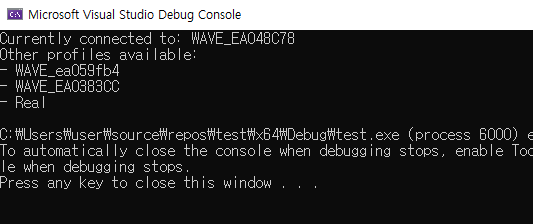
WlanQueryInterface 인자를 잘못 넘겼다
이 코드가 처음엔 제대로 안 돌았다. 문제는 이 호출이다.
1
2
3
ret = WlanQueryInterface(clientHandle, &pIfInfo->InterfaceGuid,
    wlan_intf_opcode_current_connection, NULL,
    (PDWORD)&pConnectInfo, (PVOID)&pConnectInfo, NULL);
WlanQueryInterface의 뒤쪽 인자 두 개는 성격이 다른 출력 인자다.
1
2
3
4
5
6
7
8
DWORD WlanQueryInterface(
    HANDLE hClientHandle,
    const GUID *pInterfaceGuid,
    WLAN_INTF_OPCODE OpCode,
    PVOID pReserved,
    PDWORD pdwDataSize,      // 받은 데이터의 크기가 들어온다
    PVOID *ppData,           // 받은 데이터의 포인터가 들어온다
    PWLAN_OPCODE_VALUE_TYPE pWlanOpcodeValueType);
그런데 위 코드는 둘 다 pConnectInfo 하나를 가리키게 넘겼다. 함수가 크기와 포인터를 같은 자리에 쓰니, 나중에 쓰인 값이 앞의 값을 덮어쓴다. pConnectInfo가 유효한 포인터가 아니라 크기 숫자가 섞인 값이 되고, 그걸 역참조하는 순간 죽는다.
(PDWORD)&pConnectInfo 쪽이 특히 고약하다. 명시적 캐스팅이라 컴파일러가 아무 말도 안 한다. 반면 (PVOID)&pConnectInfo는 PVOID* 자리에 PVOID를 넘기는 것이라 컴파일 단계에서 걸린다. 그걸 억지로 통과시키려고 캐스팅을 붙이다 보면 원래 뭐가 잘못됐는지 시야에서 사라진다.
캐스팅을 넣기 전에 왜 타입이 안 맞는지를 먼저 봤어야 했다.
1
2
3
4
5
6
7
8
9
10
11
// 수정된 WlanQueryInterface 호출
DWORD connectInfoSize = 0;

ret = WlanQueryInterface(
    clientHandle,
    &pIfInfo->InterfaceGuid,
    wlan_intf_opcode_current_connection,
    NULL,
    &connectInfoSize,
    (PVOID*)&pConnectInfo,
    NULL);
크기를 받을 DWORD 변수를 따로 두고, ppData에는 포인터의 주소를 PVOID*로 넘긴다. pdwDataSize는 선택 인자가 아니라서 NULL을 넣을 수 없다. 값을 안 쓸 거라도 변수를 하나 만들어야 한다.
이렇게 고치고 나서야 실패했을 때의 진짜 에러 코드가 보이기 시작했다. 그전에는 크래시라서 반환값을 볼 기회조차 없었다.
wcout에 narrow 리터럴을 넣으면 안 된다
같이 고친 부분이다.
1
std::wcout << "Currently connected to: " << ...;
std::wcout은 wchar_t 스트림이라 const char*를 받는 삽입 연산자가 없다. 그래서 const void* 오버로드로 잡히고, 문자열 내용 대신 포인터 주소가 16진수로 찍힌다. C++20에서 이 상황이 아예 컴파일 에러가 되도록 바뀐 걸 보면 실수하는 사람이 많았던 모양이다.
L 접두사를 붙이면 된다.
1
std::wcout << L"Currently connected to: " << profileName << std::endl;
한글 프로필 이름을 콘솔에 찍으려면 출력 모드도 같이 바꿔야 한다.
1
2
3
#include <io.h>
#include <fcntl.h>
_setmode(_fileno(stdout), _O_U16TEXT);
이 모드로 바꾸면 std::cout(narrow)을 섞어 쓸 수 없다. 위 코드는 에러 메시지를 std::cerr로 내보내고 있는데 그쪽은 stdout이 아니라서 괜찮지만, 로그를 한 군데로 모을 거면 전부 와이드로 통일하는 게 맞다.
접두사로 장비 프로필 고르기
1
2
3
4
5
6
7
8
9
10
11
12
13
14
std::wstring connectedProfileName = ConvertWCharToString(pConnectInfo->strProfileName);

for (DWORD j = 0; j < profileList->dwNumberOfItems; j++) {
    PWLAN_PROFILE_INFO profileInfo = &profileList->ProfileInfo[j];
    std::wstring profileName = ConvertWCharToString(profileInfo->strProfileName);

    if (profileName == connectedProfileName) {
        std::wcout << L"Matched connected WiFi profile: " << profileName << std::endl;
        // "VISION"으로 시작하는 프로필 선택
        if (profileName.compare(0, 6, L"VISION") == 0) {
            std::wcout << L"Selected profile: " << profileName << std::endl;
        }
    }
}
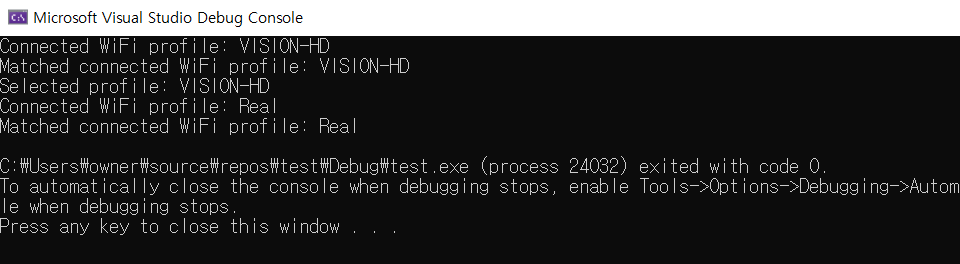
compare(0, 6, L"VISION")은 앞 6글자만 비교한다. 접두사 길이를 손으로 세서 넣는 게 마음에 안 들어서 나중에 이렇게 바꿨다.
1
2
3
4
static bool starts_with(const std::wstring& s, const std::wstring& prefix)
{
    return s.rfind(prefix, 0) == 0;      // 위치 0에서만 찾는다
}
rfind(prefix, 0)은 “0번 위치 이하에서 뒤로 찾기”라 사실상 위치 0에서만 검사한다. C++20이면 s.starts_with(L"VISION") 한 줄이다.
접두사 비교 자체가 좋은 방법은 아니라는 것도 나중에 알았다. 사무실에 VISION_TEST라는 다른 사람의 AP가 하나 생기면서 그것도 장비로 잡혔다. 이름 규칙에 기대는 대신, 접속한 뒤 장비에 확인 명령을 한 번 보내서 응답으로 판정하는 쪽으로 바꿨다. 이름은 후보를 좁히는 데만 쓴다.
정리한 함수
실제 프로그램에 들어간 형태는 이렇다. 화면 출력 대신 판정 결과만 돌려준다.
1
2
3
4
5
6
7
8
9
10
11
12
13
14
15
16
17
18
19
20
21
22
23
24
25
26
27
28
29
30
31
32
33
34
35
36
37
38
39
enum class WifiCheck { NotConnected, WrongAp, Ok };

WifiCheck CheckDeviceAp(const std::wstring& prefix)
{
    HANDLE h = nullptr;
    DWORD ver = 0;
    if (WlanOpenHandle(2, nullptr, &ver, &h) != ERROR_SUCCESS)
        return WifiCheck::NotConnected;

    PWLAN_INTERFACE_INFO_LIST ifs = nullptr;
    if (WlanEnumInterfaces(h, nullptr, &ifs) != ERROR_SUCCESS) {
        WlanCloseHandle(h, nullptr);
        return WifiCheck::NotConnected;
    }

    WifiCheck result = WifiCheck::NotConnected;

    for (DWORD i = 0; i < ifs->dwNumberOfItems; ++i) {
        const auto& info = ifs->InterfaceInfo[i];
        if (info.isState != wlan_interface_state_connected) continue;

        PWLAN_CONNECTION_ATTRIBUTES conn = nullptr;
        DWORD size = 0;
        if (WlanQueryInterface(h, &info.InterfaceGuid,
                               wlan_intf_opcode_current_connection,
                               nullptr, &size, (PVOID*)&conn, nullptr) != ERROR_SUCCESS)
            continue;

        const std::wstring name = conn->strProfileName;
        result = starts_with(name, prefix) ? WifiCheck::Ok : WifiCheck::WrongAp;

        WlanFreeMemory(conn);
        break;
    }

    WlanFreeMemory(ifs);
    WlanCloseHandle(h, nullptr);
    return result;
}
NotConnected와 WrongAp를 나눈 이유는, 현장에서 사용자에게 보여줄 안내가 다르기 때문이다. 전자는 “Wi-Fi를 켜세요”, 후자는 “장비 AP로 바꿔주세요”다. 하나로 뭉뚱그리면 안내를 보고도 뭘 해야 할지 모른다.
정리하면
WlanQueryInterface의pdwDataSize와ppData는 별개 출력 인자다. 같은 변수를 넘기면 포인터가 깨진다- 명시적 캐스팅으로 타입 에러를 덮으면 컴파일러가 잡아줄 실수를 런타임으로 미루게 된다
std::wcout에"..."를 넣으면 주소가 찍힌다.L"..."를 쓴다- 접두사 검사는
rfind(prefix, 0) == 0, C++20이면starts_with - 이름 규칙만으로 장비를 판별하면 비슷한 이름이 생겼을 때 오판한다. 실제 통신으로 확인하는 단계를 두는 게 맞다