(C++) 현재 연결된 와이파이의 SSID 검출
WlanQueryInterface로 현재 연결 정보를 직접 받아오는 방법. 연결이 없을 때 나는 에러, 프로필 이름과 실제 SSID의 차이, 신호 품질 값을 dBm으로 되돌리는 식까지 정리했다.
앞에서 잘못 짠 걸 고쳤다
앞 글에서는 주변 네트워크 목록을 받아온 다음 그중에서 연결된 걸 찾으려 했다. 목록에서 dwIndex를 인덱스로 잘못 쓰는 바람에 엉뚱한 AP 이름이 나왔고, 고치고 나서도 여전히 돌아가는 길이었다. 주변 목록을 다 받아올 필요가 없다.
현재 연결 정보만 딱 집어서 물어보는 조회가 따로 있다. WlanQueryInterface에 wlan_intf_opcode_current_connection을 주면 된다.
코드
1
2
3
4
5
6
7
8
9
10
11
12
13
14
15
16
17
18
19
20
21
22
23
24
25
26
27
28
29
30
31
32
33
34
35
36
37
38
39
40
41
42
43
44
45
46
47
48
49
50
51
52
53
54
55
#include <iostream>
#include <Windows.h>
#include <wlanapi.h>
#include <objbase.h>
#include <wtypes.h>
#pragma comment(lib, "Wlanapi.lib")
#pragma comment(lib, "ole32.lib")

int main() {
    DWORD negotiatedVersion;
    HANDLE clientHandle = NULL;

    // Initialize the handle to the WLAN client.
    DWORD ret = WlanOpenHandle(2, NULL, &negotiatedVersion, &clientHandle);
    if (ret != ERROR_SUCCESS) {
        std::cerr << "WlanOpenHandle failed with error: " << ret << std::endl;
        return 1;
    }

    PWLAN_INTERFACE_INFO_LIST ifList = NULL;
    ret = WlanEnumInterfaces(clientHandle, NULL, &ifList);
    if (ret != ERROR_SUCCESS) {
        std::cerr << "WlanEnumInterfaces failed with error: " << ret << std::endl;
        return 1;
    }

    for (DWORD i = 0; i < ifList->dwNumberOfItems; i++) {
        PWLAN_INTERFACE_INFO pIfInfo = &ifList->InterfaceInfo[i];
        PWLAN_CONNECTION_ATTRIBUTES pConnectInfo = NULL;

        // Get the current connection attributes.
        DWORD connectInfoSize = 0;
        ret = WlanQueryInterface(
            clientHandle,
            &pIfInfo->InterfaceGuid,
            wlan_intf_opcode_current_connection,
            NULL,
            &connectInfoSize,
            (PVOID*)&pConnectInfo,
            NULL);

        if (ret != ERROR_SUCCESS) {
            std::cerr << "WlanQueryInterface failed with error: " << ret << std::endl;
            continue;
        }

        std::wcout << L"SSID: " << pConnectInfo->strProfileName << std::endl;

        WlanFreeMemory(pConnectInfo);
    }

    WlanFreeMemory(ifList);
    WlanCloseHandle(clientHandle, NULL);
    return 0;
}
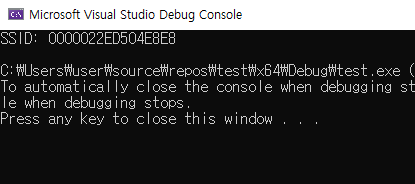
앞 글과 달리 dwNumberOfItems만큼 인터페이스를 돌고, 각각에 대해 연결 정보를 물어본다.
연결이 없으면 실패한다
Wi-Fi를 끄거나 아직 접속 전이면 WlanQueryInterface가 ERROR_INVALID_STATE(5023)를 돌려준다. 위 코드는 continue로 넘어가니 크래시는 안 나지만, 에러 메시지가 콘솔에 찍힌다. 프로그램 시작할 때마다 “실패” 로그가 보이면 실제 문제가 있을 때 눈에 안 띈다.
인터페이스 상태를 먼저 보고 거르는 편이 낫다.
1
2
if (pIfInfo->isState != wlan_interface_state_connected)
    continue;      // 연결 안 된 인터페이스는 물어볼 것도 없다
isState에는 이 값들이 온다.
| 값 | 의미 |
|---|---|
wlan_interface_state_not_ready | 어댑터가 비활성 상태 |
wlan_interface_state_connected | 접속 완료 |
wlan_interface_state_disconnected | 접속 안 됨 |
wlan_interface_state_associating | 연결 시도 중 |
wlan_interface_state_authenticating | 인증 중 |
접속을 요청하고 완료를 기다릴 때 associating과 authenticating을 지나간다. 연결 후 바로 조회하면 아직 connected가 아닐 수 있어서, 폴링할 때 이 상태를 같이 봐야 한다.
무선 어댑터가 아예 없는 PC
데스크톱에 유선만 있으면 WlanEnumInterfaces 자체는 성공하고 dwNumberOfItems가 0이다. 실패로 처리하면 안 되고, “무선 없음”으로 분기해야 한다.
그리고 WlanOpenHandle이 ERROR_SERVICE_NOT_ACTIVE(1062)로 실패하는 경우가 있다. WLAN AutoConfig 서비스(WlanSvc)가 꺼져 있을 때다. 서버 OS나 회사에서 관리하는 PC에서 이 서비스를 꺼두는 일이 있어서, 실제로 현장 PC 한 대에서 이걸로 걸렸다. 에러 코드를 그대로 로그에 남겨두지 않았으면 원인을 못 찾았을 것이다.
strProfileName은 SSID가 아니다
출력에 SSID:라고 찍어놓고 실제로는 프로필 이름을 보여주고 있다. 대개 같은 값이라 티가 안 나는데, 사용자가 저장된 네트워크 이름을 바꿨으면 달라진다.
진짜 SSID는 wlanAssociationAttributes.dot11Ssid에 있다.
1
2
const DOT11_SSID& ssid = pConnectInfo->wlanAssociationAttributes.dot11Ssid;
std::string s(reinterpret_cast<const char*>(ssid.ucSSID), ssid.uSSIDLength);
ucSSID는 UCHAR[32]이고 널로 끝나지 않는다. uSSIDLength를 같이 써야 한다. 이걸 모르고 printf("%s", ssid.ucSSID)로 찍었다가 SSID 뒤에 쓰레기 문자가 붙어 나온 적이 있다.
연결 정보에 더 들어 있는 것
WLAN_CONNECTION_ATTRIBUTES를 한 번 받아오면 쓸 만한 게 여러 개 딸려 온다. 따로 조회할 필요가 없다.
1
2
3
4
5
6
7
8
9
10
const auto& a = pConnectInfo->wlanAssociationAttributes;
const auto& s = pConnectInfo->wlanSecurityAttributes;

// a.dot11Bssid        : 접속한 AP 의 MAC (6바이트)
// a.wlanSignalQuality : 0~100
// a.ulRxRate, ulTxRate: kbps
// a.dot11BssType      : 인프라(ESS) / 애드혹(IBSS)
// s.bSecurityEnabled  : 보안 사용 여부
// s.dot11AuthAlgorithm: WPA2PSK 등
// s.dot11CipherAlgorithm: CCMP(AES) 등
wlanSignalQuality가 0~100이라 dBm으로 착각하기 쉬운데 백분율이다. 문서에 0이 −100 dBm, 100이 −50 dBm에 해당하고 그 사이는 선형이라고 적혀 있으니 되돌릴 수 있다.
품질 70이면 −65 dBm이다. 장비 AP에 붙었을 때 신호가 얼마나 나오는지 기록해두려고 이 값을 로그에 남겼는데, 백분율보다 dBm이 다른 측정 장비의 값과 바로 비교돼서 쓰기 편했다.
BSSID를 따로 뽑는 얘기는 WlanAPI를 이용한 Wi-Fi MAC 주소 검출에 정리했다.
wcout으로 한글이 안 나온다
std::wcout에 한글 SSID를 넣으면 아무것도 안 찍히거나 중간에 출력이 멈춘다. 스트림의 기본 로케일이 “C”라서 아스키 범위 밖 문자를 변환하다 실패하고, 그 시점에 스트림이 실패 상태가 되어 이후 출력이 전부 무시된다.
콘솔 출력 모드를 UTF-16으로 바꿔주면 깔끔하다.
1
2
3
4
5
#include <io.h>
#include <fcntl.h>

_setmode(_fileno(stdout), _O_U16TEXT);
std::wcout << L"SSID: " << ssid << std::endl;
이 모드에서는 std::cout(narrow)을 섞어 쓰면 안 된다. 같은 스트림에 두 모드가 섞이면 런타임 어설션이 뜬다. 앞 글에서 wcout.imbue(locale("kor"))을 썼는데 그것도 되긴 하지만, "kor" 로케일 이름이 없는 환경에서 예외가 나서 결국 _setmode 쪽으로 갔다.
정리한 함수
실제로는 이 형태로 잘라 뒀다.
1
2
3
4
5
6
7
8
9
10
11
12
13
14
15
16
17
18
19
20
21
22
23
24
25
26
27
28
29
30
31
32
33
34
35
36
37
38
39
40
41
42
43
44
45
46
47
48
49
struct WifiStatus {
    bool         connected = false;
    std::wstring profile;
    std::string  ssid;        // 원본 바이트 그대로
    int          rssi_dbm = 0;
    UCHAR        bssid[6] = {};
};

bool GetWifiStatus(WifiStatus& out)
{
    HANDLE h = nullptr;
    DWORD ver = 0;
    if (WlanOpenHandle(2, nullptr, &ver, &h) != ERROR_SUCCESS)
        return false;

    PWLAN_INTERFACE_INFO_LIST ifs = nullptr;
    if (WlanEnumInterfaces(h, nullptr, &ifs) != ERROR_SUCCESS) {
        WlanCloseHandle(h, nullptr);
        return false;
    }

    bool found = false;
    for (DWORD i = 0; i < ifs->dwNumberOfItems && !found; ++i) {
        const auto& info = ifs->InterfaceInfo[i];
        if (info.isState != wlan_interface_state_connected) continue;

        PWLAN_CONNECTION_ATTRIBUTES conn = nullptr;
        DWORD size = 0;
        if (WlanQueryInterface(h, &info.InterfaceGuid,
                               wlan_intf_opcode_current_connection,
                               nullptr, &size, (PVOID*)&conn, nullptr) != ERROR_SUCCESS)
            continue;

        const auto& a = conn->wlanAssociationAttributes;
        out.connected = true;
        out.profile   = conn->strProfileName;
        out.ssid.assign(reinterpret_cast<const char*>(a.dot11Ssid.ucSSID),
                        a.dot11Ssid.uSSIDLength);
        out.rssi_dbm  = static_cast<int>(a.wlanSignalQuality) / 2 - 100;
        std::memcpy(out.bssid, a.dot11Bssid, sizeof(out.bssid));
        found = true;

        WlanFreeMemory(conn);
    }

    WlanFreeMemory(ifs);
    WlanCloseHandle(h, nullptr);
    return found;
}
관리자 권한은 필요 없다. 조회만 하는 API라 일반 사용자로 그냥 돈다. 프로필을 추가하거나 연결을 바꾸는 쪽으로 가면 이야기가 달라진다.
정리하면
- 현재 연결 정보는
wlan_intf_opcode_current_connection한 번으로 끝난다. 주변 목록을 훑을 필요가 없다 - 조회 전에
isState == wlan_interface_state_connected로 걸러야 불필요한 에러가 안 찍힌다 - 무선 어댑터가 없으면
dwNumberOfItems가 0이고, WlanSvc가 꺼져 있으면WlanOpenHandle이 1062로 실패한다 strProfileName과dot11Ssid는 다른 값이다. SSID는 널 종료가 아니므로 길이를 같이 쓴다wlanSignalQuality는 백분율이고,quality/2 - 100으로 dBm이 나온다